
AI Design
AI Design is a top-level Design view beside Editor. It helps turn a description of a game or a change into a proposal you can inspect before applying. The Definitions list stays visible, and you can switch between AI Design and Editor while working on the same game.
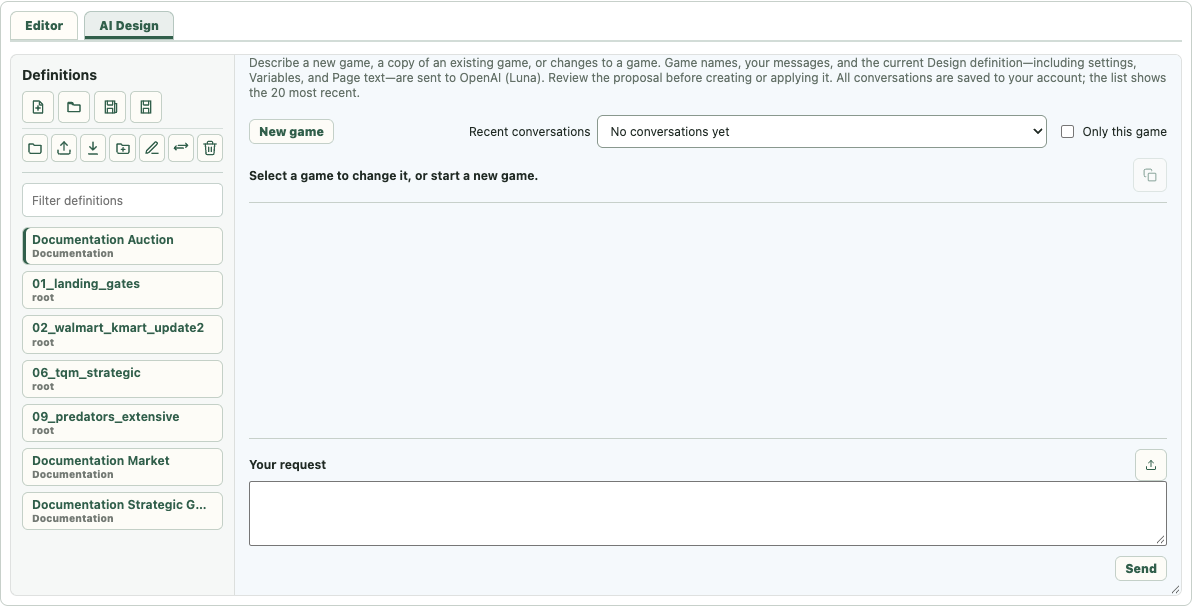
Start or continue a conversation
Select a definition to work on that game. Its conversations are available in Recent conversations, and choosing a conversation linked to another definition opens that game in Editor as well. Only this game shows conversations linked to the current game; turn it off to browse the recent account history. The list shows the 20 most recent conversations, while older conversations remain saved to the account.
Use New game to begin without an open definition. If the current definition has unsaved changes, choose Save, Discard, or Cancel before it closes. You can describe a game from scratch or explicitly ask to copy an existing one, including the last selected game. A new-game conversation does not silently copy the last selection. Closing a definition in Editor also leaves AI Design ready for a new-game request.
An existing-game conversation stays attached to that game. To create another game, click New game first; mentioning or quoting “create a new game” in the current conversation does not switch games automatically.
The first conversation that creates a definition is labelled Creation: [game name]; later conversations linked to it are labelled Change: [game name]. A later rename updates those labels. When a conversation is linked to a game, applying a change keeps that game and conversation open so you can continue refining it.
Review and apply a proposal
Describe the desired result in Your request. The assistant may ask for missing details. When it can make a change, it shows a plan with concrete steps and a preview of the resulting definition. Review the steps, especially removals and changes to existing Pages, before choosing Create game or Apply changes. A proposal labelled Preview · not saved has not changed the saved definition.
Each proposal remains beside the assistant's reply in the conversation. Expand it to see its steps; the label shows whether it is awaiting approval, replaced by a later proposal, or applied. Follow-up corrections normally revise the pending candidate, and Apply accepts the complete revised plan. If you change only the proposed game name, the create action uses that name without asking you to approve a second plan. A failed request keeps the unanswered text in the request field for another attempt.
Applying a proposal stores a new Design revision and opens the resulting game in Editor. Any unrelated local unsaved changes must be saved or discarded before Apply. Validation or compilation errors in the preview must be resolved before creation or application; a proposal that was not applied remains reviewable in the conversation.
If validation rejects a proposal, its reply and diagnostic details remain in the conversation. Expand the rejected proposal to inspect the available steps and any identified failing command. Nothing from that rejected proposal is saved. Continue in the same conversation to ask Luna to explain or revise it; a new conversation is unnecessary.
Current design scope
AI Design can create and revise supported Auction, Market, Strategic Form, Extensive Form, and Free Form definitions, copy an existing game when requested, and propose changes to connected Assignment, Data model, Layout, Gameplay, and Page settings. It uses the same definition model and validation as Editor. Formula and Page edits should still be checked in the resulting Editor view, particularly when a request refers to existing content by meaning rather than exact name.
For auctions, the assistant can set sealed-bid, English, and Dutch mechanisms, information and settlement rules, price and timing settings, and a sequence of up to two auctions. It can revise an existing sequence as well as create one. For Market games it can configure assets, player accounts, trading rules, valuation, and result calculations. A request to display a value during trading needs a calculation available during trading; Before Results is for final results. For Strategic Form games it can set up named players and actions, fill a complete payoff table, and change individual actions. Nature is included only when requested; its outcome weights need not total 1. If all weights are blank, the outcomes are equally likely.
For Extensive Form games, describe the order of decisions, the information visible to each player, any Nature outcomes, and the payoffs. The assistant can build and revise the tree and information sets. For Free Form games, describe the Stage flow, participant inputs, calculations, routes, and final Results. Complex games can be built in smaller reviewed proposals while keeping the original rules in the conversation.
AI Design does not need a special command for every full game. It composes supported Design operations into a reviewable sequence. If a requested behavior is unavailable, the assistant should say what is missing rather than silently omit it. You can finish or correct any proposal directly in Editor.
Language and data
The panel follows the selected interface language. Conversations and authored Page text stay in the language in which they were written; switching the interface language does not translate earlier conversation content. Game names, messages, and the current Design definition, including settings, Variables, and Page text, are sent to OpenAI (Luna) when you submit a request. Conversations are saved to your account.